Mobile appSocial media & communityOriginal by Pinterest
Pinterest works less like a social network and more like a visual discovery and planning engine. People collect home decor, wedding, recipe or outfit ideas on boards, and each save helps the system understand better what they like. Because users are focused on future plans, the platform is a very valuable showcase for brands just before a purchase decision.
Building something similar takes a quickly loading visual feed in a masonry layout, boards and a saving system, search that finds similar images from an image and an interest-based recommendation engine. A browser extension for saving pins from websites, product catalogue import for brands, an ads panel and a moderation process for copyright complaints are also part of the ecosystem.

How Pinterest works: the core user flow

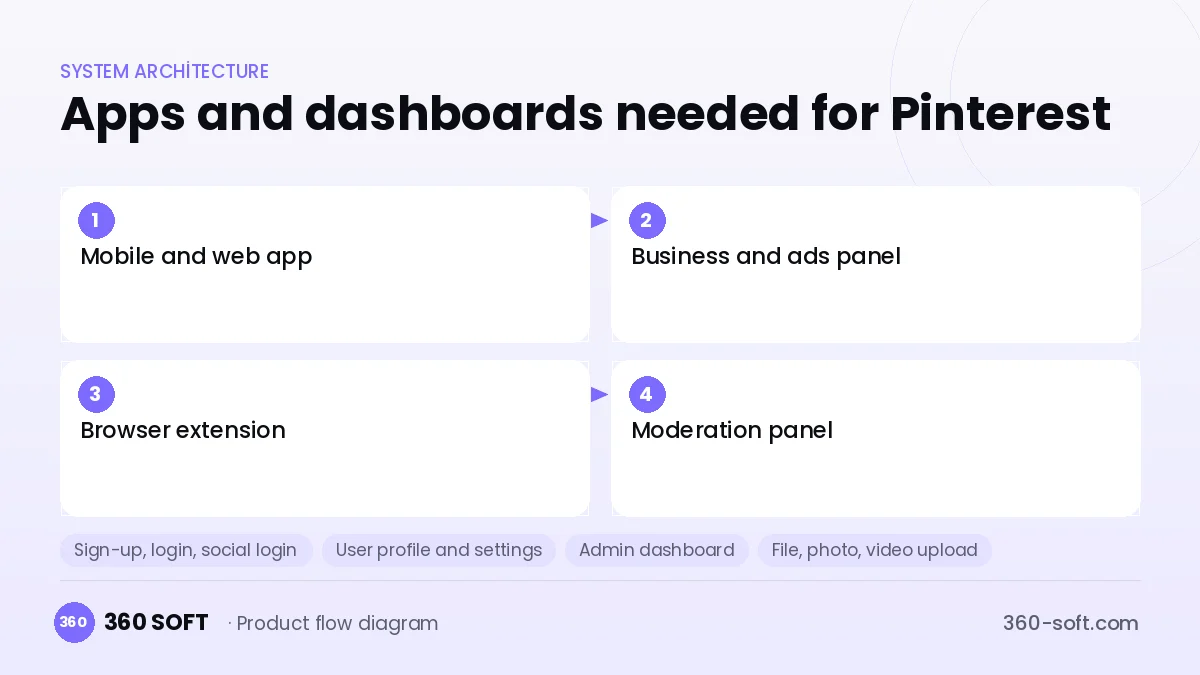
How many apps and dashboards do you need?
Mobile and web app
The user interfaces for discovering images, saving them to boards, searching and creating pins.
Business and ads panel
A panel where brands upload product catalogues, run sponsored pins and monitor statistics.
Browser extension
An extension for saving an image from any website to a board in one click.
Moderation panel
An internal panel for reviewing copyright complaints, spam pins and harmful content.
Critical features of a product like Pinterest
Masonry visual feed
Images of different sizes are shown quickly in a column layout with infinite scroll, preloading and blurred previews.
Boards and sections
Users organise pins into themed boards and sub-sections, and boards can be opened up for collaboration.
Visual search
Vector-based search lets users select part of an image to find similar products and ideas.
Interest graph
Saves, clicks and searches feed a topic graph that powers the personal home feed.
Shopping pins
Brand catalogues are imported automatically, and price and stock stay current on the pin.
Source links
Every pin links to the original web page, sending traffic to source sites and supporting content creators.
What goes into the first version, what comes later
First version (MVP)
- Image upload and creating pins from links
- Boards and saving
- Interest selection and a masonry feed
- Keyword search
- Copyright complaints and basic moderation
Later releases
- Image-to-image visual search
- Browser extension
- Business accounts, catalogues and shopping pins
- Sponsored pins and an ads panel
Modules and how the budget is calculated
The budget is calculated with 360 SOFT’s pricing model from the modules below, about 30 screens and the project’s complexity: roughly 193 person-days for the full scope and 110 person-days for the first version. Every module you drop lowers the budget directly.
| Module | Phase |
|---|---|
| Sign-up, login, social login | First version |
| User profile and settings | First version |
| Admin dashboard | First version |
| File, photo, video upload | First version |
| Advanced search and filters | First version |
| AI features (LLM, RAG, recommendations) | Later release |
| Product / content catalogue | First version |
| Push notifications | First version |
| Reporting and analytics | Later release |
| Third-party API integration | First version |
| GDPR and security hardening | First version |
| Roles and permissions | First version |
Hosting, SMS, map APIs, app store accounts and payment-provider fees are separate items. Maintenance and improvements (optional): €650 / month. We send a fixed written price within 24 hours after a free discovery call.
The hard parts
Visual similarity infrastructure
Extracting vectors for millions of images and finding similar ones in milliseconds takes embedding models and a vector database.
Copyright management
For images users save from other sites, you need a fast takedown process, attribution and re-upload detection.
Performance
In an image-heavy feed, smoothness even on mobile data needs multiple sizes, modern formats and CDN optimisation.
Business model
The main revenue model is sponsored pins, with ads in the feed and in search for brands that want to reach people close to purchase intent. Affiliate commissions from shopping pins and an advanced analytics package for businesses add more. In a niche version (architecture, fashion, weddings), featured-placement packages can be sold to suppliers.
Get a free quote for your project
Let us scope it together and send a fixed written quote within 24 hours. NDA on request; you own the source code.
Choosing a company to build an app like Pinterest
Most people searching “build an app like pinterest” are really looking for a reliable app development company. When comparing quotes, check four things:
- Can you try similar products they have shipped, in the stores or live?
- Are the source code, design files, servers and store accounts transferred to you by contract?
- Do they show a working demo every two weeks, with written scope and acceptance criteria?
- Are maintenance, scaling and GDPR/security costs written into the quote?
Copyright and trademarks
A business model and features are generally not protected on their own, but the Pinterest name, logo, interface design, content and source code are. That is why we build a product with similar functionality but your own brand, design and code. This is not legal advice; we recommend a trademark search before launch.
Frequently asked questions
How long does it take to build an app like Pinterest?
A first version with pins, boards, a feed and search can be ready in a few months. Visual search and shopping catalogues are later phases that are added as data builds up.
Does it make sense to build a niche Pinterest?
Yes; visual discovery platforms focused on a single area such as architecture, weddings, fashion or recipes can reach supplier and brand revenue faster.
Will there be copyright or trademark issues?
The visual discovery business model is free to use; the name, logo, interface and code cannot be copied. A copyright complaint and takedown process should be set up for user content; this is not legal advice.
What should I look for in an app development company for a Pinterest-style app?
Ask about experience with image processing, vector search and recommender systems, and make clear how mobile performance tests will be run.