Mobile appVideo, music & mediaOriginal by Google
Snapseed won people over by squeezing the power of desktop photo software into a phone and making it controllable with simple finger gestures. Selective adjust, brush, perspective and curves tools deliver professional results while the interface stays clean. User trust rests on non-destructive editing: every step is kept in a stack, any step can be changed later, and the original photo is never altered.
Building something similar is technically a single mobile app, but the difficulty sits in the image-processing core. You need a shader-based filter pipeline running on the GPU, RAW file decoding, masking, high-resolution export and smooth previews on low-end hardware. The backend is light: a small service and admin panel are enough to distribute ready-made presets and filter packs, manage remote configuration, and handle crash tracking and usage analytics.

How Snapseed works: the core user flow

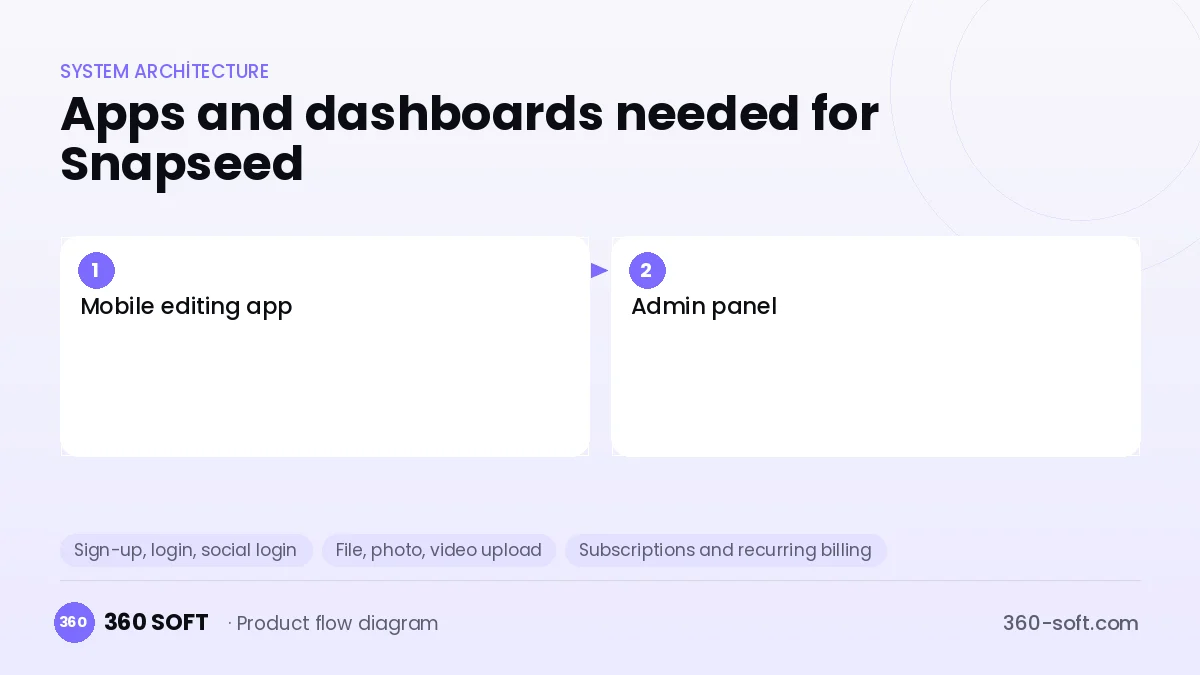
How many apps and dashboards do you need?
Mobile editing app
The main app where users open photos, apply tools, then save and share the result.
Admin panel
A team panel for managing filter packs, presets, remote settings and release announcements.
Critical features of a product like Snapseed
Non-destructive edit stack
Each operation is stored as its own step; users can reopen an earlier step to change its parameters or mask it.
GPU-accelerated filter engine
Exposure, contrast, tone and colour operations are previewed in real time with OpenGL/Metal shaders.
Selective adjust and brush
Tapping a point on the image changes brightness, saturation and structure for that region only.
RAW and high-resolution support
RAW files such as DNG can be opened, and the final export keeps full resolution and EXIF data.
Perspective and healing tools
Straighten leaning buildings, remove unwanted blemishes and fill edges automatically.
Saved looks
Users save a sequence of edits as a look and apply it to other photos with one tap.
What goes into the first version, what comes later
First version (MVP)
- Basic adjustment tools (light, colour, sharpness, crop, rotate)
- 15 to 20 ready-made filters with real-time preview
- Undo / redo and edit history
- Import from the gallery, export at full resolution
- Direct sharing to Instagram and WhatsApp
Later releases
- RAW file development
- Brush-based selective masking
- AI object removal and sky replacement
- Sharing user looks and a community feed
Modules and how the budget is calculated
The budget is calculated with 360 SOFT’s pricing model from the modules below, about 16 screens and the project’s complexity: roughly 106 person-days for the full scope and 79 person-days for the first version. Every module you drop lowers the budget directly.
| Module | Phase |
|---|---|
| Sign-up, login, social login | First version |
| File, photo, video upload | First version |
| Subscriptions and recurring billing | First version |
| Online payments (Stripe / PSP) | First version |
| Admin dashboard | First version |
| Offline mode and sync | First version |
| Push notifications | First version |
| Reporting and analytics | Later release |
Hosting, SMS, map APIs, app store accounts and payment-provider fees are separate items. Maintenance and improvements (optional): €350 / month. We send a fixed written price within 24 hours after a free discovery call.
The hard parts
Performance across devices
To keep the same filter smooth on both flagship and entry-level Android phones, the preview and full-resolution pipelines need to be separated.
Memory management
Layered processing of large photos can cause out-of-memory crashes; tile-based processing and smart caching are essential.
Colour accuracy
Colour-space conversions must be handled correctly so the result looks the same across different screens and colour profiles.
Business model
The most common model for an editor like this is freemium: basic tools stay free, while advanced filter packs, RAW support and AI tools unlock with a monthly or yearly subscription. One-off filter packs and sponsored filter collaborations with brands add extra revenue; ads should be limited to the free tier and kept from disrupting the editing experience.
Get a free quote for your project
Let us scope it together and send a fixed written quote within 24 hours. NDA on request; you own the source code.
Choosing a company to build an app like Snapseed
Most people searching “build an app like snapseed” are really looking for a reliable app development company. When comparing quotes, check four things:
- Can you try similar products they have shipped, in the stores or live?
- Are the source code, design files, servers and store accounts transferred to you by contract?
- Do they show a working demo every two weeks, with written scope and acceptance criteria?
- Are maintenance, scaling and GDPR/security costs written into the quote?
Copyright and trademarks
A business model and features are generally not protected on their own, but the Snapseed name, logo, interface design, content and source code are. That is why we build a product with similar functionality but your own brand, design and code. This is not legal advice; we recommend a trademark search before launch.
Frequently asked questions
How long does it take to build an app like Snapseed?
A first version with core tools and filters is usually ready within a few months. The most time-consuming part is optimising the image-processing core across different devices.
Can it be built with Flutter, or is native code required?
The interface can be written in Flutter or React Native, but building the filter engine with native code and GPU shaders is almost a must for performance. A hybrid architecture is the most balanced option.
Are there copyright or trademark issues?
The photo-editing app business model and tool types are generally free to use. However, the name, logo, interface design, icons and code cannot be copied; this information is not a substitute for legal advice.
What should I look for when choosing a photo editing app development company?
Ask whether the company has prior experience with image processing, GPU programming and store releases. Being able to present a test plan for low-end devices is also a strong signal.