SaaS / business softwareAI productsOriginal by Synthesia
Synthesia makes it possible to produce corporate video featuring a speaking human without a camera, studio or crew. Teams creating training, onboarding and product videos write the text, pick an avatar and get the same video in dozens of languages within minutes. The real value is that when content changes, the video can be refreshed in one click without a reshoot, which directly affects the training budget of large companies.
Building something similar requires a scene-based video editor that runs in the browser, image models that generate avatars and lip sync, a text-to-speech engine and a render pipeline that processes videos in order. Enterprise customers also expect workspaces, brand templates, approval flows and LMS integration. For custom avatars, a person's consent and image rights need to be managed as a separate operational process.
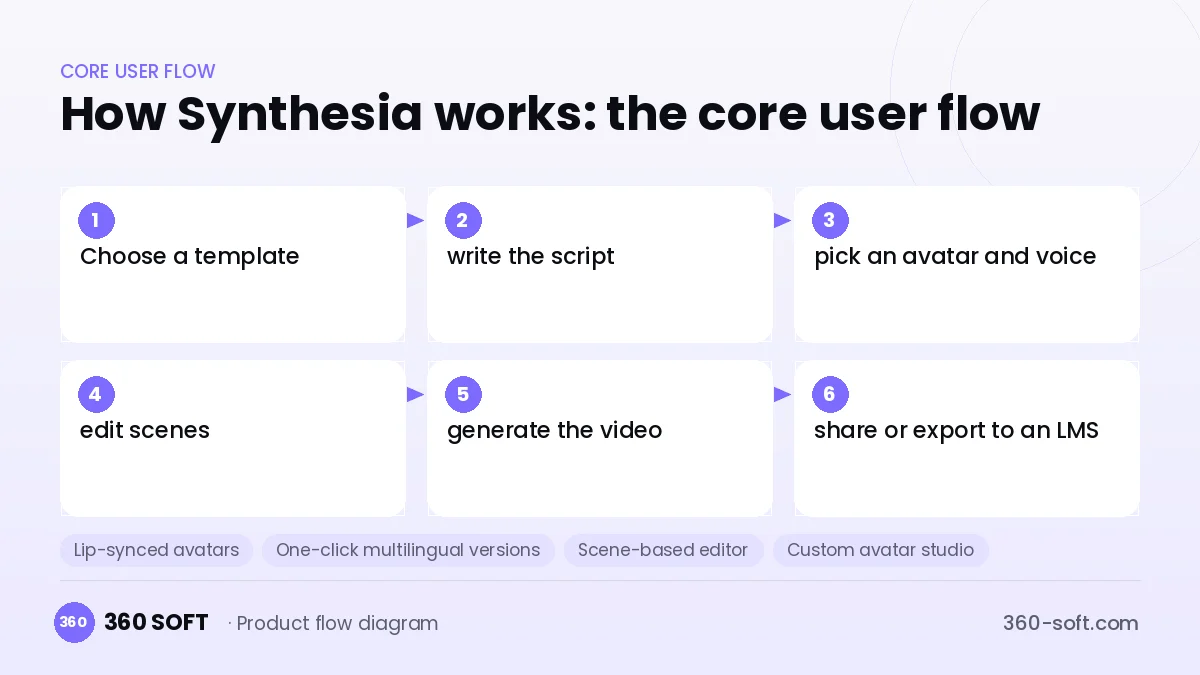
How Synthesia works: the core user flow
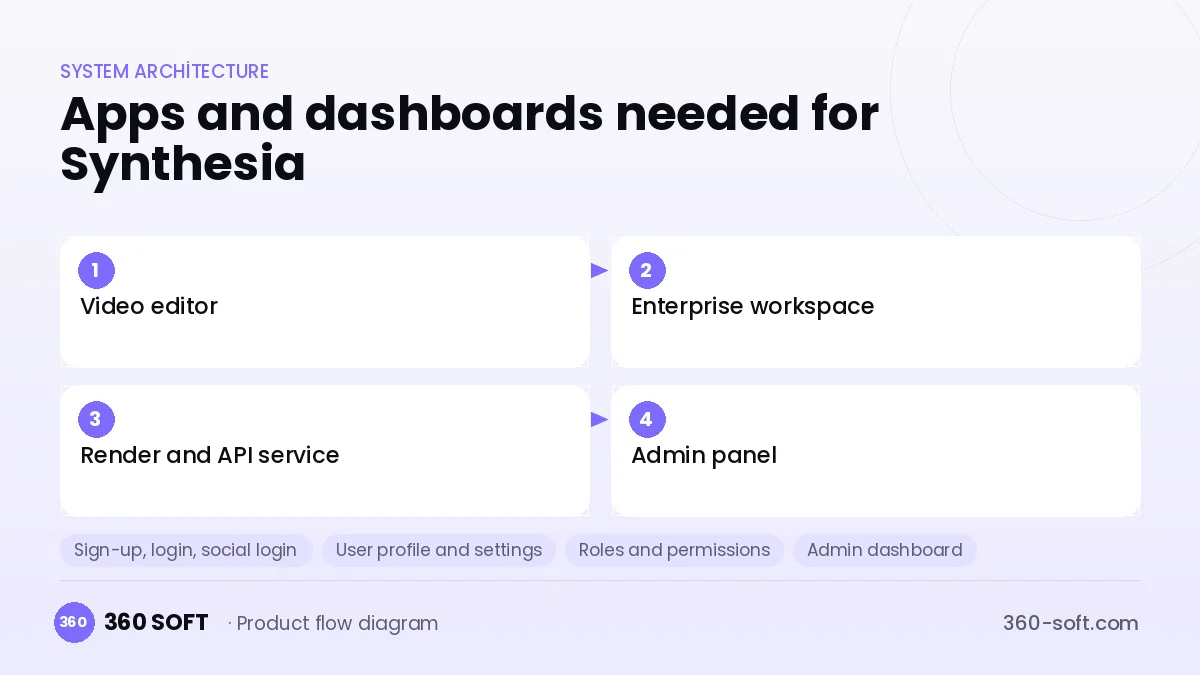
How many apps and dashboards do you need?
Video editor
The web interface where training and marketing teams drag and drop scenes, text, avatars and visuals.
Enterprise workspace
The shared space where team members share brand templates and comment on and approve drafts.
Render and API service
The back end that generates videos on GPUs and serves automated video requests from other systems.
Admin panel
The panel that manages minute quotas, custom avatar requests, content moderation and billing.
Critical features of a product like Synthesia
Lip-synced avatars
Voice-over is matched to mouth movements, and the avatar's gestures and expressions look natural for the script.
One-click multilingual versions
The same video is copied into other languages through automatic translation and voice-over, with subtitles generated alongside.
Scene-based editor
In a presentation-style interface, each scene has its own text, background and media layers.
Custom avatar studio
A company executive or trainer creates a digital twin from a short shoot, and the consent document is stored in the system.
Brand kit and templates
Logo, colours, fonts and intro-outro animations are locked across the team to keep everything consistent.
LMS and SCORM export
Training videos are delivered to internal learning systems as SCORM packages or embedded players.
What goes into the first version, what comes later
First version (MVP)
- Text-to-video with ready-made avatars and voices
- Basic scene editor and a few templates
- Voice-over and subtitles in English and a few other languages
- Subscription with minute quotas and payments
- Admin panel that monitors the render queue
Later releases
- Custom avatar creation process
- Multilingual video copies through automatic translation
- Team workspace with comments and approval flow
- SCORM export and a video generation API
Modules and how the budget is calculated
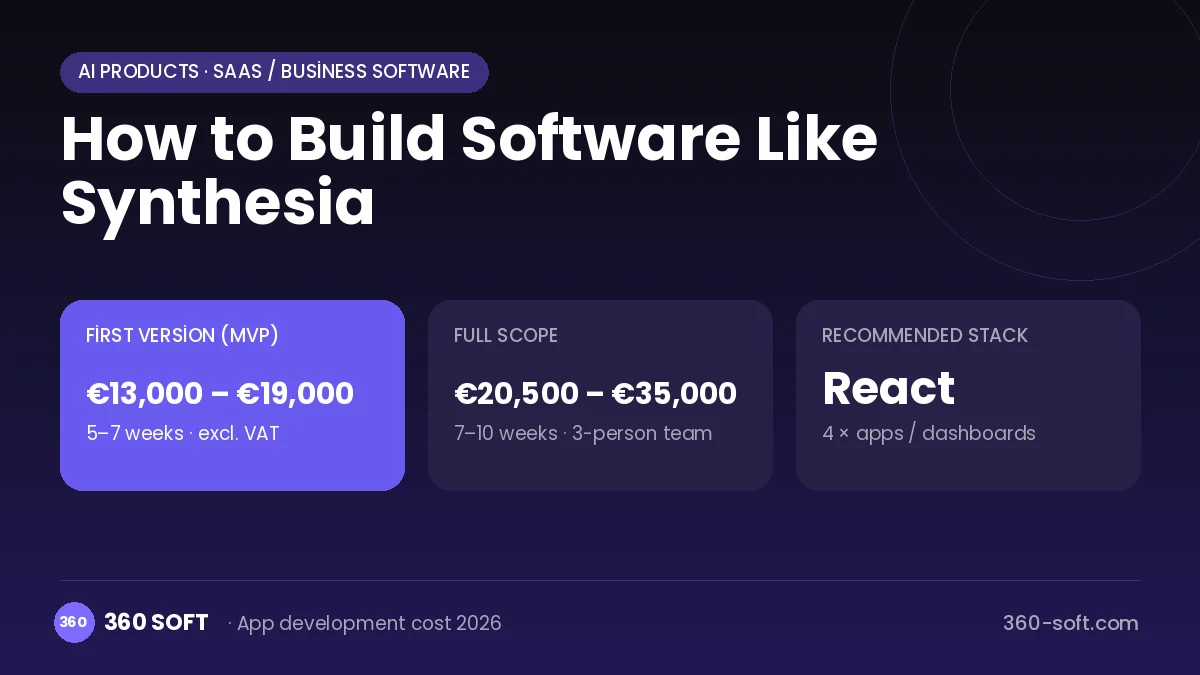
The budget is calculated with 360 SOFT’s pricing model from the modules below, about 26 screens and the project’s complexity: roughly 78 person-days for the full scope and 50 person-days for the first version. Every module you drop lowers the budget directly.
| Module | Phase |
|---|---|
| Sign-up, login, social login | First version |
| User profile and settings | First version |
| Roles and permissions | First version |
| Admin dashboard | First version |
| Subscriptions and recurring billing | First version |
| Online payments (Stripe / PSP) | First version |
| AI features (LLM, RAG, recommendations) | Later release |
| Video / voice calls | First version |
| File, photo, video upload | First version |
| Multi-language | First version |
| Third-party API integration | First version |
| Reporting and analytics | Later release |
Hosting, SMS, map APIs, app store accounts and payment-provider fees are separate items. Maintenance and improvements (optional): €300 / month. We send a fixed written price within 24 hours after a free discovery call.
The hard parts
Render time and cost
Every minute of video means GPU time; without scene caching and parallel processing, waiting times become unacceptable.
Deepfake risk
Avatars can be used for misleading content; a content policy, automated script moderation and proof of consent for custom avatars are mandatory.
In-browser editor performance
Previews, the timeline and media uploads get heavy in multi-scene projects; the editor architecture must be designed well from the start.
Business model
The revenue model is a SaaS subscription based on a monthly quota of video minutes. Individual plans offer limited avatars and minutes, while enterprise plans include custom avatars, a brand kit, single sign-on and priority rendering. Custom avatar creation can be charged as a one-off fee and API usage billed per generated minute; annual contracts strengthen cash flow.
Get a free quote for your project
Let us scope it together and send a fixed written quote within 24 hours. NDA on request; you own the source code.
Choosing a company to build an app like Synthesia
Most people searching “build software like synthesia” are really looking for a reliable app development company. When comparing quotes, check four things:
- Can you try similar products they have shipped, in the stores or live?
- Are the source code, design files, servers and store accounts transferred to you by contract?
- Do they show a working demo every two weeks, with written scope and acceptance criteria?
- Are maintenance, scaling and GDPR/security costs written into the quote?
Copyright and trademarks
A business model and features are generally not protected on their own, but the Synthesia name, logo, interface design, content and source code are. That is why we build a product with similar functionality but your own brand, design and code. This is not legal advice; we recommend a trademark search before launch.
Frequently asked questions
How long does it take to build software like Synthesia?
A first version using ready-made avatar and voice models through an API can be prepared in a few months. Building your own avatar model and adding enterprise features calls for a phased, longer roadmap.
Do we need to develop avatar models from scratch?
Not necessarily; starting with licensed avatar and lip-sync services speeds up time to market. Once quality and cost become the competitive edge, a move to your own model can be planned.
Will there be copyright or trademark issues?
The text-to-video business model and features are generally free to use, but the name, logo, design, avatar images, content and code cannot be copied. Written consent must be obtained for avatars of real people; this is not legal advice.
What should I look for when choosing an AI video software company?
Ask about video processing pipelines, GPU queue management and browser-based editor experience. If you are targeting enterprise sales, experience with single sign-on, permission management and GDPR compliance matters too.