SaaS / business softwareBusiness software & SaaS
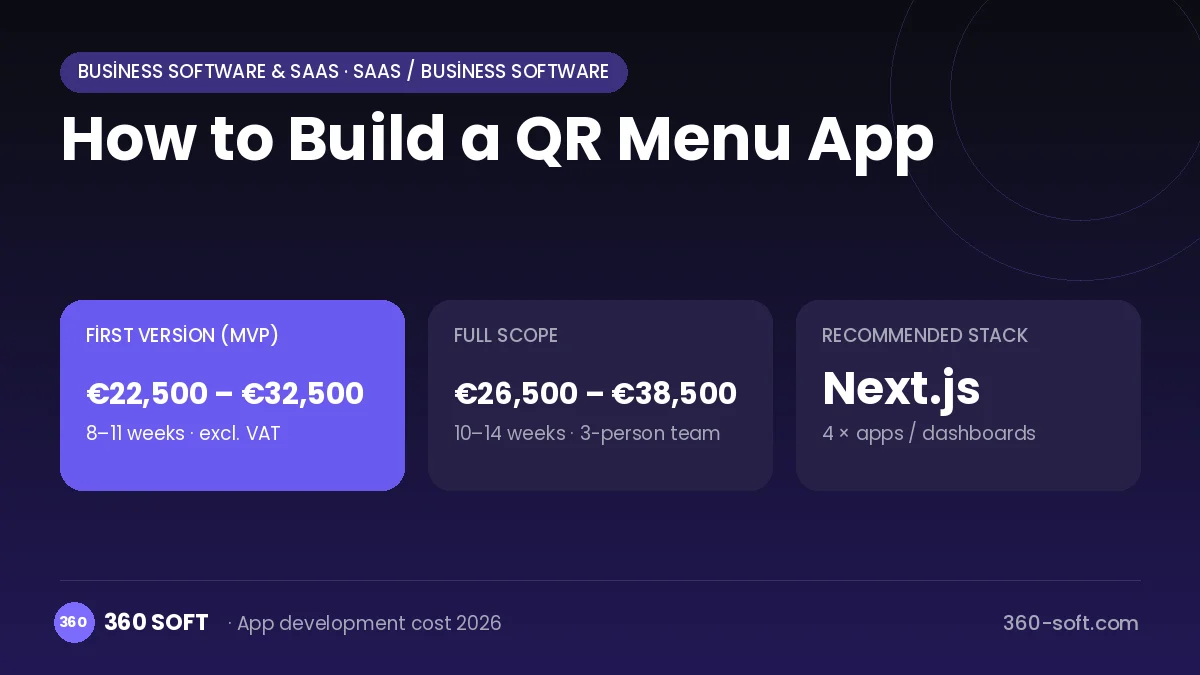
A QR menu lets customers scan a code at the table and reach the menu without downloading an app. The real value for the venue is that it removes the rigidity of a printed menu: a price change, a sold-out item or a new promotion goes live in seconds. Photos, allergen information and foreign-language support lift sales in tourist areas, and adding table ordering reduces the load on servers.
To build this product you need a fast-loading mobile web menu, a dashboard where venues manage menus and tables, and a subscription infrastructure that hosts many venues. If table ordering and payment are added, a kitchen display or order-management integration and a connection to a licensed payment provider come into play. The product looks simple; competition is won on design quality, speed and ease of setup.
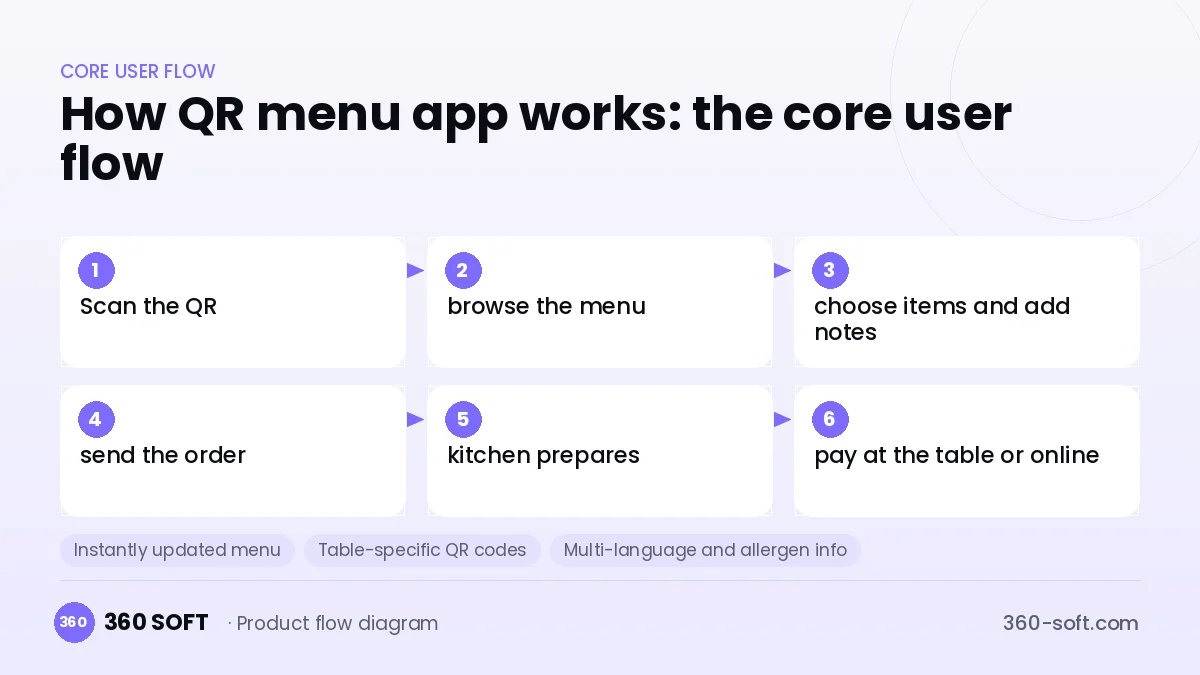
How QR menu app works: the core user flow
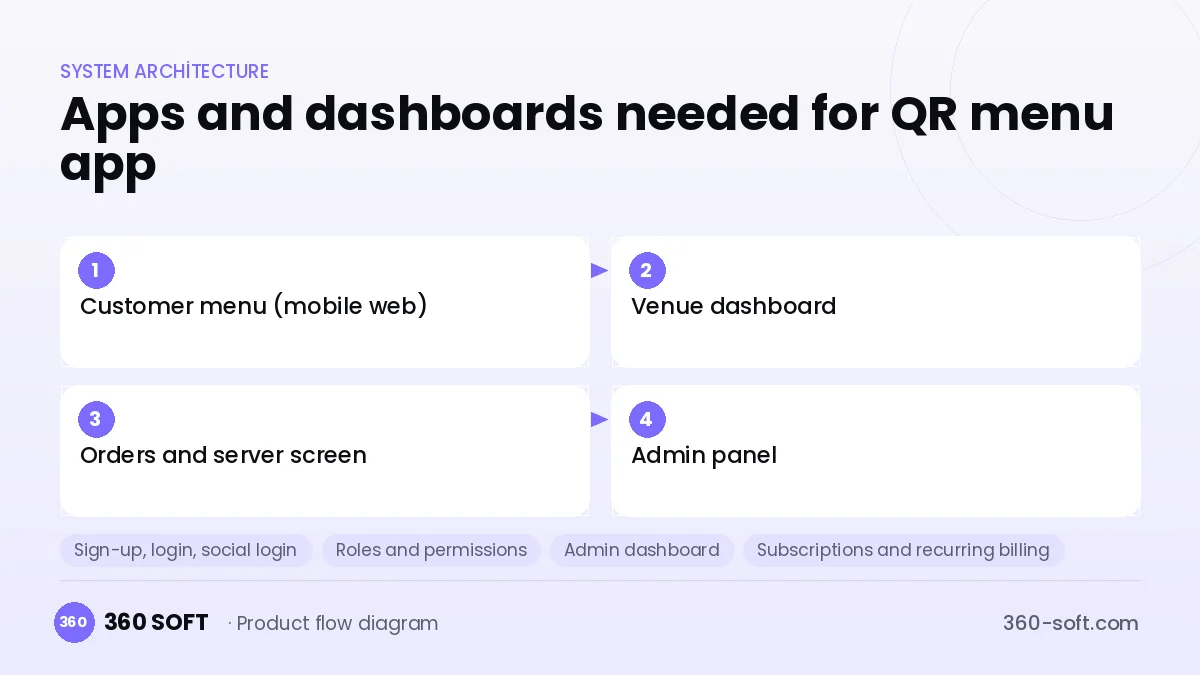
How many apps and dashboards do you need?
Customer menu (mobile web)
The fast mobile page guests open by QR, where they can view items and place an order.
Venue dashboard
The dashboard where the restaurant owner manages the menu, prices, photos, tables and QR codes.
Orders and server screen
The tablet or phone screen where table orders and server calls arrive.
Admin panel
The internal panel that manages subscribed venues, plans, payments and support requests.
Critical features of a product like QR menu app
Instantly updated menu
Prices, sold-out labels and the daily special are changed from the dashboard and show immediately at every table.
Table-specific QR codes
A separate code is generated for each table, so orders and calls arrive with the table they came from.
Multi-language and allergen info
The menu is translated into several languages, and allergen, calorie and vegetarian labels can be filtered.
Table ordering and call-a-server
Guests send their order or ask for the bill, and the notification goes to the right server.
Timed menus and promotions
Breakfast, lunch and happy hour menus switch automatically by time of day, and promotion banners can be added.
View analytics
The most viewed and most ordered items are reported, so the menu design can be improved with data.
What goes into the first version, what comes later
First version (MVP)
- Mobile web menu with a category structure
- Menu and photo management through the venue dashboard
- Table-specific QR code generation
- Two-language support
- Monthly subscription and a free trial
Later releases
- Table ordering and call-a-server
- Pay at the table through a licensed payment provider
- Order-management / POS integration
- Customer feedback and loyalty points
Modules and how the budget is calculated
The budget is calculated with 360 SOFT’s pricing model from the modules below, about 16 screens and the project’s complexity: roughly 101 person-days for the full scope and 85 person-days for the first version. Every module you drop lowers the budget directly.
| Module | Phase |
|---|---|
| Sign-up, login, social login | First version |
| Roles and permissions | First version |
| Admin dashboard | First version |
| Subscriptions and recurring billing | First version |
| Product / content catalogue | First version |
| Cart and checkout | First version |
| File, photo, video upload | First version |
| Multi-language | First version |
| Email / SMS notifications | First version |
| Reporting and analytics | Later release |
Hosting, SMS, map APIs, app store accounts and payment-provider fees are separate items. Maintenance and improvements (optional): €350 / month. We send a fixed written price within 24 hours after a free discovery call.
The hard parts
Speed and weak connections
Mobile signal can be poor in restaurants; the menu must open in under a second and images must be optimised.
Differentiation
A basic QR menu is easy to copy; deeper features such as ordering, payment and POS integration make the difference.
Venue habits
Venues that do not keep the menu up to date abandon the product; easy import and ready-made templates keep them using it.
Business model
Venues pay a monthly or annual subscription; a free basic menu can be separated from paid plans that include ordering, multi-language and analytics. Once pay-at-table is added, per-transaction revenue sharing with a licensed payment partner is possible. Printed QR stands and table cards, and services such as menu photography, are small but profitable extras.
Get a free quote for your project
Let us scope it together and send a fixed written quote within 24 hours. NDA on request; you own the source code.
Choosing a company to build an app like QR menu app
Most people searching “build a qr menu app” are really looking for a reliable app development company. When comparing quotes, check four things:
- Can you try similar products they have shipped, in the stores or live?
- Are the source code, design files, servers and store accounts transferred to you by contract?
- Do they show a working demo every two weeks, with written scope and acceptance criteria?
- Are maintenance, scaling and GDPR/security costs written into the quote?
Copyright and trademarks
A business model and features are generally not protected on their own, but the QR menu app name, logo, interface design, content and source code are. That is why we build a product with similar functionality but your own brand, design and code. This is not legal advice; we recommend a trademark search before launch.
Frequently asked questions
How long does it take to build a QR menu app?
A system that only shows the menu and is managed from a dashboard can be ready in a few weeks. The timeline stretches to a few months as table ordering, payment and POS integration are added.
Do customers need to download an app?
No; a QR menu works as a mobile web page and opens in the browser when the code is scanned with the camera. This significantly increases usage.
Ready-made script or custom software?
For a single venue, a ready-made QR menu service is enough. If you will sell subscriptions to many venues, custom software is the better route for a multi-tenant dashboard and branded design.
What should I look for when choosing a company to build QR menu software?
Choose a team with experience in fast mobile web, multi-tenant dashboards and POS integration. Ask how they handle image optimisation and hosting.