SaaS / business softwareAI productsOriginal by Otter.ai
Otter.ai spread by taking the burden of note-taking out of meetings. The assistant joins the meeting, transcribes the conversation in real time, separates the speakers and shares a summary and action items when the meeting ends. Attendees focus on the meeting; someone who missed it goes back to the recording to search the relevant section or asks the assistant "what was decided on this?". The growing meeting archive becomes company memory over time.
To build something similar you need a meeting bot (joining Zoom, Google Meet and Microsoft Teams), real-time speech recognition, speaker separation, LLM-based summaries and Q&A, a searchable transcript archive and calendar integration. Recognition accuracy needs tuning for company jargon and accents. Informing participants that a recording is being made, and consent and notice processes under GDPR and local recording laws, must also be part of the product flow.

How Otter.ai works: the core user flow

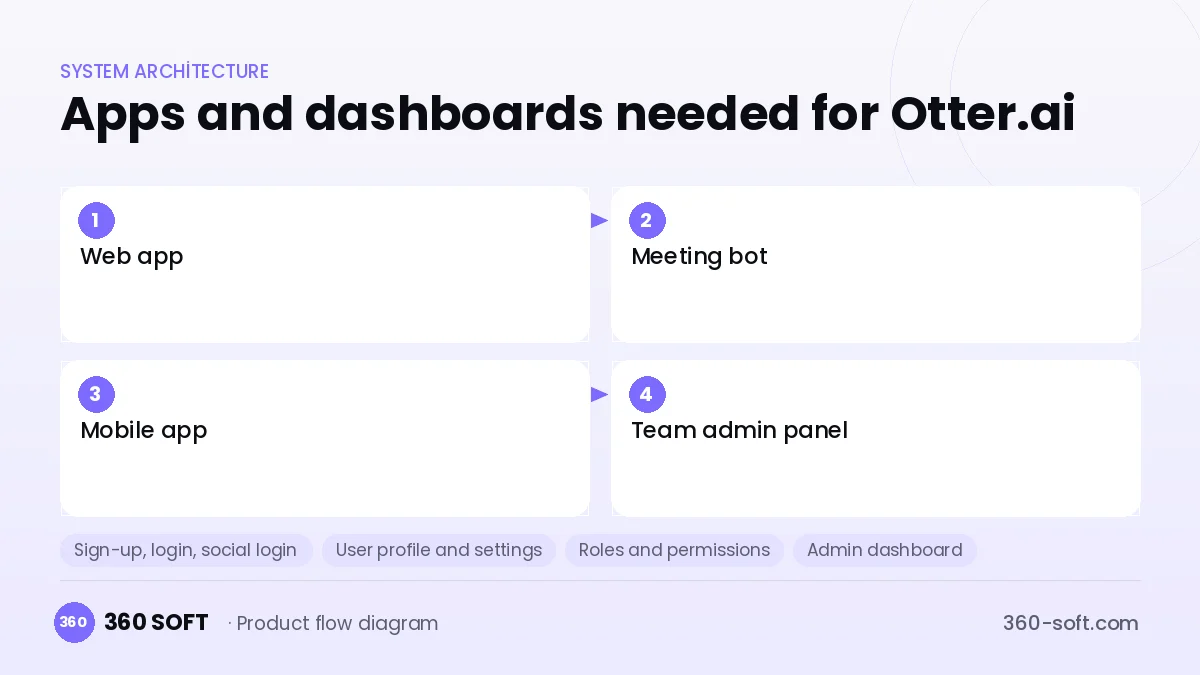
How many apps and dashboards do you need?
Web app
The interface where transcripts, summaries and action items are viewed, searched and shared.
Meeting bot
The service that joins video conference meetings, records the audio and relays the live transcript.
Mobile app
The app for recording in-person meetings and lectures and watching the transcript in real time.
Team admin panel
The panel for managing users, sharing permissions, retention periods and usage quotas.
Critical features of a product like Otter.ai
Real-time transcript
Speech is turned into text within seconds, and attendees follow the live text and flag important moments.
Speaker separation
Voice fingerprints and meeting data identify who said which sentence.
AI summary and actions
At the end of the meeting, topics, decisions and action items assigned to people are extracted automatically.
Q&A across the meeting archive
Users ask questions across all past meetings, and answers come with links to the relevant transcript section.
Calendar and conferencing integration
The bot joins calendar meetings automatically, and the summary is sent by email or to a team chat tool.
Custom vocabulary
Product names, abbreviations and people's names are added to improve recognition accuracy.
What goes into the first version, what comes later
First version (MVP)
- Uploading an audio file to get a transcript
- A meeting bot for Zoom or Meet
- Speaker separation
- AI summaries and action items
- Searchable transcript archive
Later releases
- Live transcript and mobile recording
- Q&A across all meetings
- CRM and project management integrations
- Sales call analytics and coaching
Modules and how the budget is calculated
The budget is calculated with 360 SOFT’s pricing model from the modules below, about 22 screens and the project’s complexity: roughly 74 person-days for the full scope and 46 person-days for the first version. Every module you drop lowers the budget directly.
| Module | Phase |
|---|---|
| Sign-up, login, social login | First version |
| User profile and settings | First version |
| Roles and permissions | First version |
| Admin dashboard | First version |
| Subscriptions and recurring billing | First version |
| Online payments (Stripe / PSP) | First version |
| AI features (LLM, RAG, recommendations) | Later release |
| File, photo, video upload | First version |
| Advanced search and filters | First version |
| Email / SMS notifications | First version |
| GDPR and security hardening | First version |
| Third-party API integration | First version |
| Reporting and analytics | Later release |
Hosting, SMS, map APIs, app store accounts and payment-provider fees are separate items. Maintenance and improvements (optional): €250 / month. We send a fixed written price within 24 hours after a free discovery call.
The hard parts
Recognition accuracy
Overlapping speech, poor microphones and industry terms raise error rates, so model tuning and a custom vocabulary are needed.
Platform restrictions
Meeting platforms' bot and recording policies can change, so official integration routes must be followed.
Privacy and consent
Participants must be informed before recording and notice given under GDPR and local recording laws; retention should be shortened for sensitive meetings.
Business model
A freemium model is common: the free plan gives limited monthly transcript minutes, while paid plans offer longer meetings, advanced AI features and integrations. Team plans are priced per seat. Enterprise customers sign annual contracts with SSO, data residency and custom retention policies. Call analytics for sales teams can be a separate premium package.
Get a free quote for your project
Let us scope it together and send a fixed written quote within 24 hours. NDA on request; you own the source code.
Choosing a company to build an app like Otter.ai
Most people searching “build software like otter.ai” are really looking for a reliable app development company. When comparing quotes, check four things:
- Can you try similar products they have shipped, in the stores or live?
- Are the source code, design files, servers and store accounts transferred to you by contract?
- Do they show a working demo every two weeks, with written scope and acceptance criteria?
- Are maintenance, scaling and GDPR/security costs written into the quote?
Copyright and trademarks
A business model and features are generally not protected on their own, but the Otter.ai name, logo, interface design, content and source code are. That is why we build a product with similar functionality but your own brand, design and code. This is not legal advice; we recommend a trademark search before launch.
Frequently asked questions
How long does it take to build software like Otter.ai?
A first release covering audio upload, transcripts and AI summaries can be ready in a few weeks. The meeting bot, live transcript and enterprise integrations need a few more months of development.
Is accuracy good enough in non-English meetings?
Current speech recognition models do well in many languages, but industry terms and overlapping speech raise errors. A custom vocabulary and audio-quality guidelines noticeably improve accuracy.
Will there be copyright or trademark issues?
The meeting transcript and summary business model is generally free to use; however, the name, logo, interface design, copy and code cannot be copied. Participant notice for recordings is also required; this is not legal advice.
What should I look for when choosing a company to build a meeting assistant?
Look for experience with speech recognition, LLM summarisation and video conferencing integration. Ask where the audio data is stored and how they ensure GDPR compliance.